# 2026-august-september-product-update-rendering-tools-add-ai-enhancements-function,-improve-rendering-quality
> August-September 2026 update: AI Enhance for better rendering quality in live and offline rendering, plus other tool upd
- **URL**: https://www.coohom.com/helpcenter/2026-august-september-product-update-rendering-tools-add-ai-enhancements-function%2C-improve-rendering-quality
- **Locale**: en_US
- **Updated**: 2026-10-14
## Content
This Render \& Light, Models and other tools bring new functions, welcome to experience and give feedback!
Function update reading instructions:
* Some functions are gradually being opened, and will be marked in the article as "Available to some users, gradually opening up".
* Some functions can only be used by users with relevant permissions, and will be marked in the article as "Available to some users".
* For enterprise functions, please contact the corresponding CSC for consultation.
1. Functions for Individual Users
=================================
Key Update Details
------------------
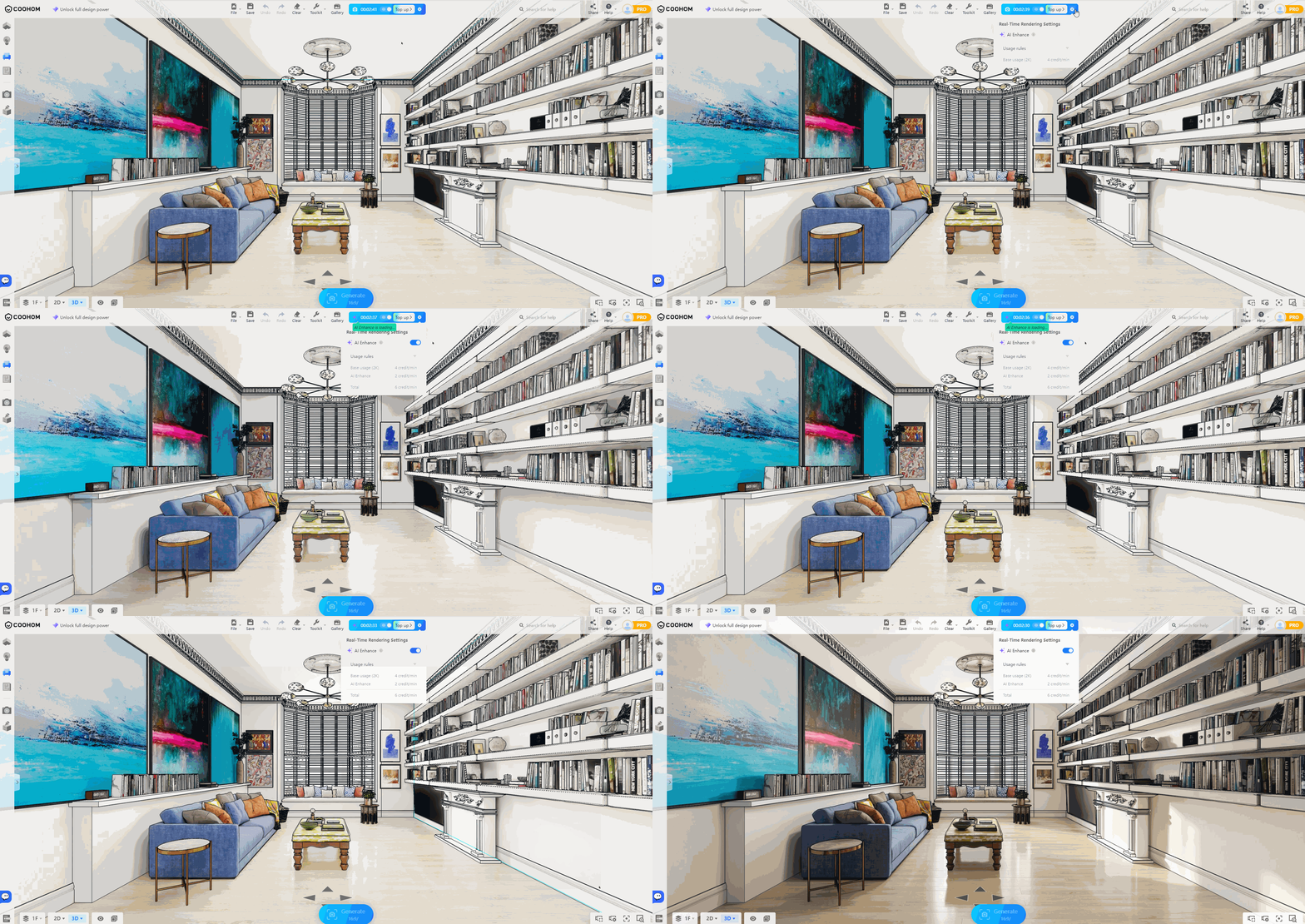
**\[Render \& Light\] Coohom supports AI enhancement features to improve rendering quality in both live rendering and offline rendering scenarios, [Click here for details and learn how to use](https://www.coohom.com/helpcenter/render-ai-enhance-tool-usage-guide?kjl_source=hc)**
In live rendering and offline rendering, you can turn on AI Enhance. The system optimizes the original rendering result to make the image more realistic and detailed.
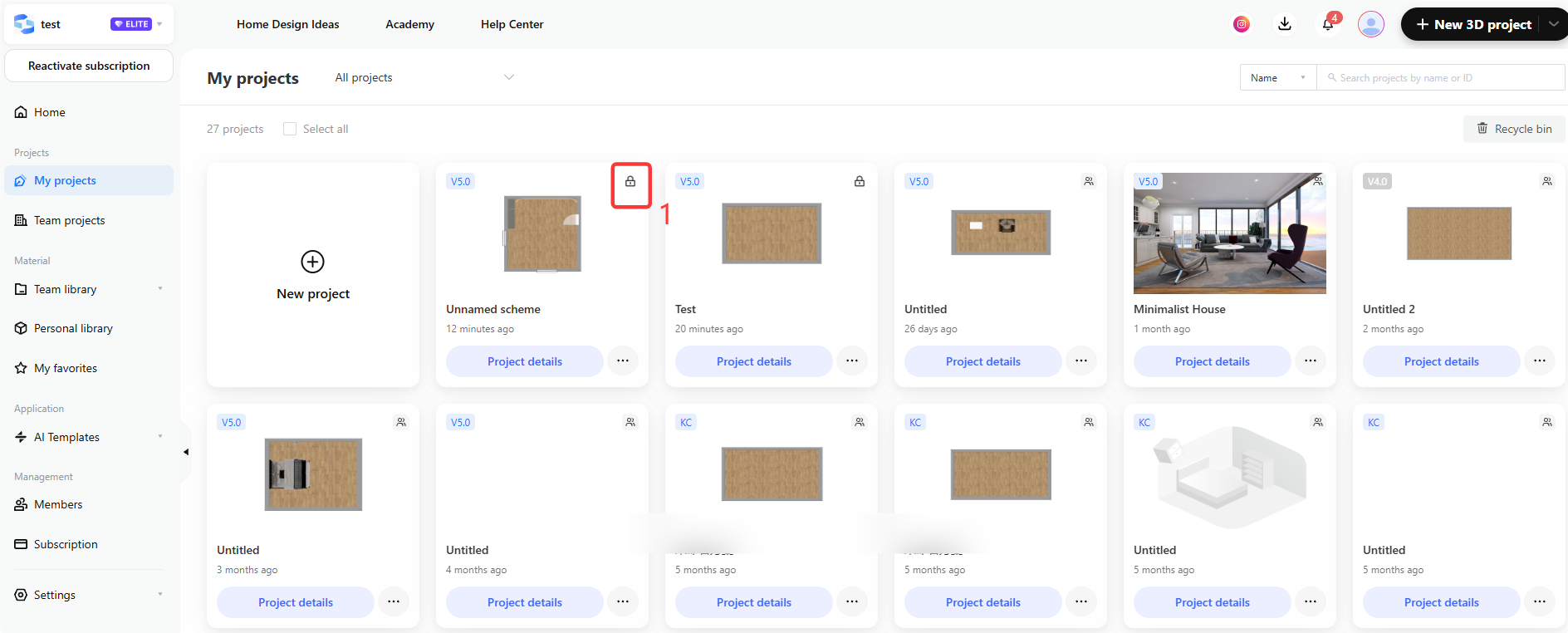
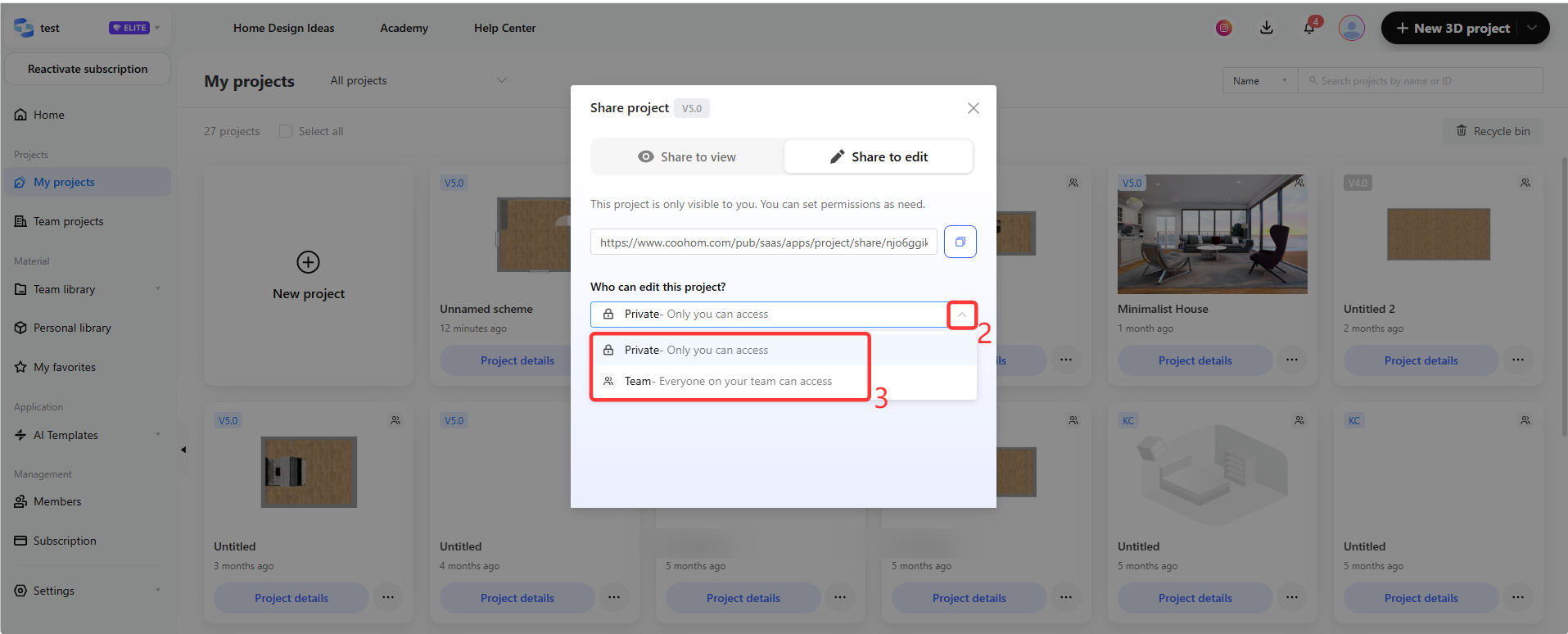
**\[Elite Team Space\] For projects created in the Team Space, creators can configure project permissions on demand (Available to newly upgraded Elite users), [Click here for details and learn how to use](https://www.coohom.com/helpcenter/elite-team-space-set-project-permissions?kjl_source=hc)**
For projects created in team space, the project creator can set project permissions and make the project visible only to themselves or to the team.
Function Update Summary
-----------------------
**\[Render \& Light\]**
* **New:** Coohom supports AI enhancement features to improve rendering quality in both live rendering and offline rendering scenarios, [Click here for details](https://www.coohom.com/helpcenter/render-ai-enhance-tool-usage-guide?kjl_source=hc)
**\[Elite Team Space\]**
* **New:** For projects created in the Team Space, creators can configure project permissions on demand (Available to newly upgraded Elite users), [Click here for details](https://www.coohom.com/helpcenter/elite-team-space-set-project-permissions?kjl_source=hc)
* **New:** Upload templates on the workspace. Once uploaded successfully, team members can use this template in the Inspiration Library (Available to newly upgraded Elite users), [Click here for details](https://www.coohom.com/helpcenter/elite-team-space-submission-guide-for-ai-templates?kjl_source=hc)
**\[Model Materials\]**
* **New:** August 2026 model topics overview, [Click here for details](https://www.coohom.com/helpcenter/august-2026-model-topic-overview?kjl_source=hc)
* **New:** September 2026 model topics overview, [Click here for details](https://www.coohom.com/helpcenter/september-2026-model-topic-overview?kjl_source=hc)
2. Functions for Enterprise Users
=================================
For details on enabling and using enterprise functions, please consult your corresponding CSC.
Key Update Details
------------------
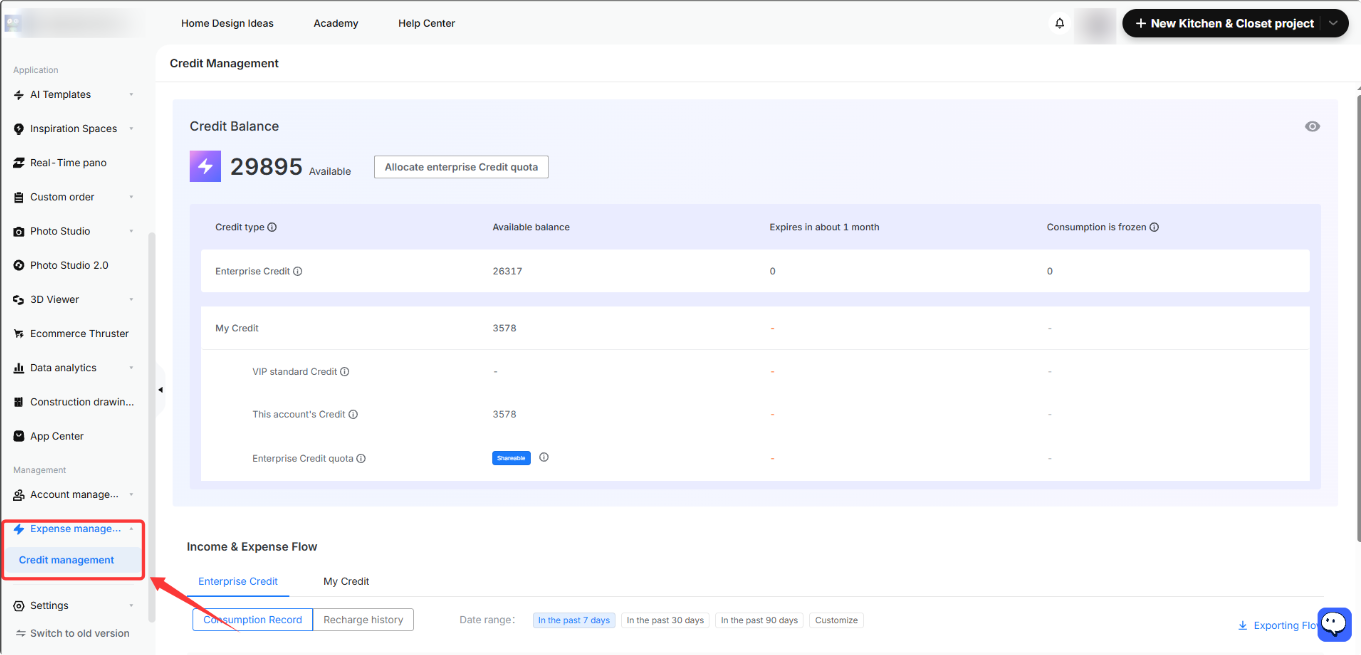
**\[Workspace\] Coohom adds credits management function (Available to some users), [Click here for details and learn how to use](https://www.coohom.com/helpcenter/coohom-enterprise-edition-credits-instructions?kjl_source=hc#chapter3_0)**
The main account administrators can view different credit balances on the credit management page, including expiring, frozen, and consumed credits. They can also allocate enterprise credit quotas, view enterprise and personal credit top-up and consumption records, and export transaction records.
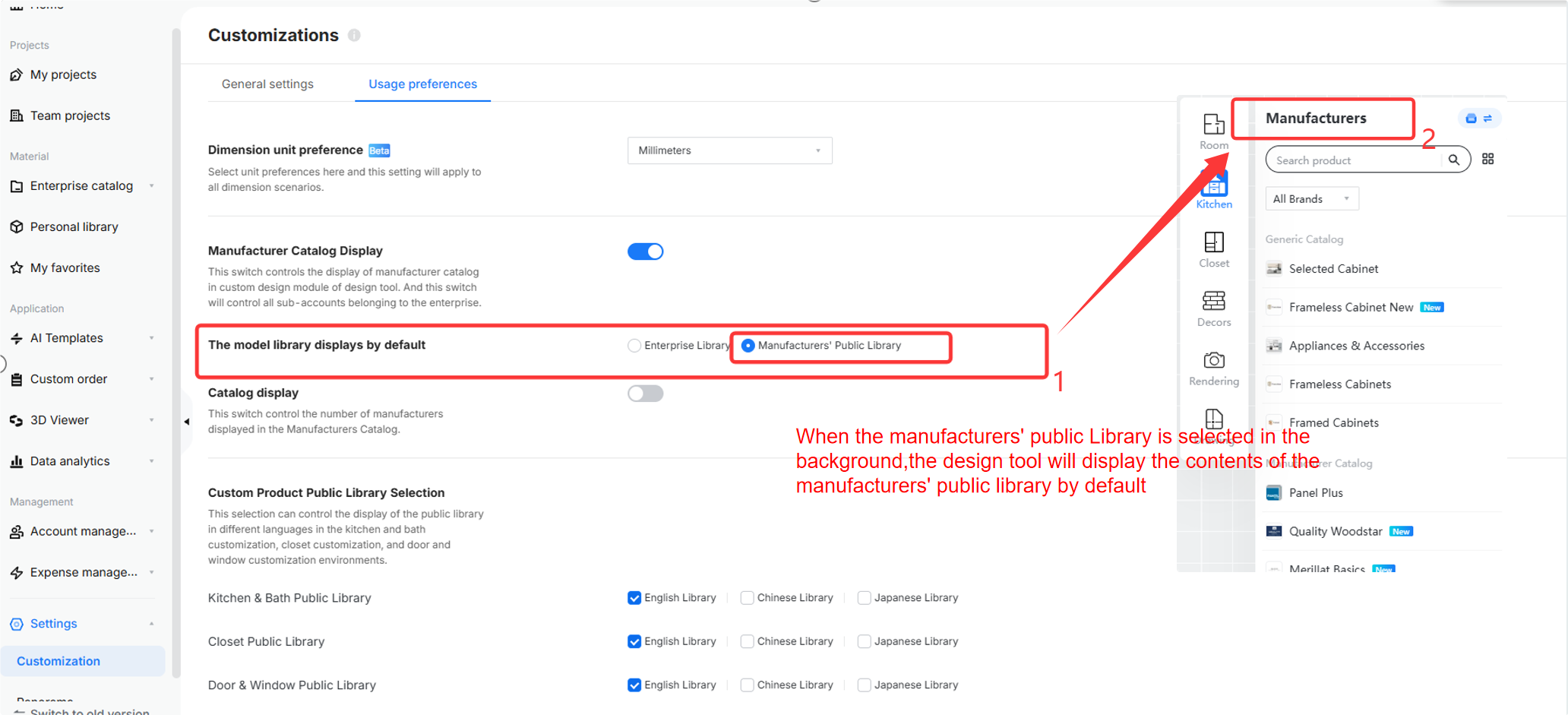
**\[Workspace\] Support setting the display range of the brand library in the tool in the background (Available to some users), [Click here for details and learn how to use](https://www.coohom.com/helpcenter/enterprise-brand-library-display-settings?kjl_source=hc)**
With a few simple settings, you can control whether the brand library is displayed, customize which product library appears by default in the design tool, and define the visible scope of the brand library in the tool.
Function Update Summary
-----------------------
**\[Workspace\]**
* **New:** Coohom adds credits management function(Available to some users), [Click here for details](https://www.coohom.com/helpcenter/coohom-enterprise-edition-credits-instructions?kjl_source=hc#chapter3_0)
* **New:** Support setting the display range of the brand library in the tool in the background (Available to some users), [Click here for details](https://www.coohom.com/helpcenter/enterprise-brand-library-display-settings?kjl_source=hc)
**\[Enterprise Catalog\]**
* **New:** Supports categorizing fields when exporting UGC parameterized models (Available to some users), [Click here for details](https://www.coohom.com/helpcenter/enterprise-ugc-multi-language-translation-function-usage-guide?kjl_source=hc#chapter2_0)
* **New:** AI layout supports configuring crown molding, toekick molding, countertops and hard decoration options in the Style background (Available to some users), [Click here for details](https://www.coohom.com/helpcenter/enterprise-ai-kitchen-automatic-layout-custom-product-template-configuration-instructions?hl=en#chapter4_0)
**\[Model Materials\]**
* **New:** August 2026 model topics overview, [Click here for details](https://www.coohom.com/helpcenter/august-2026-model-topic-overview?kjl_source=hc)
* **New:** September 2026 model topics overview, [Click here for details](https://www.coohom.com/helpcenter/september-2026-model-topic-overview?kjl_source=hc)