# aihom-create-final-visual-image
> Transform sketches and 3D designs into realistic interior renders. Enhance materials, lighting, and atmosphere, or turn designs into immersive videos. Start designing now!
- **URL**: https://www.coohom.com/helpcenter/aihom-create-final-visual-image
- **Locale**: en_US
- **Updated**: 2026-09-29
## Content
**For Users: All Coohom interior designers**
*** ** * ** ***
Turn Sketches into Realistic Renders
====================================
Upload a hand-drawn sketch or early interior concept and ask AIHom to turn it into a realistic render. Add details about the visual direction to help guide the result.
Generate a Render from a Sketch
-------------------------------
1. Upload the sketch or hand-drawn design.
2. Tell AIHom to render it.
3. Describe the intended style and visual details.
4. Review the generated image.
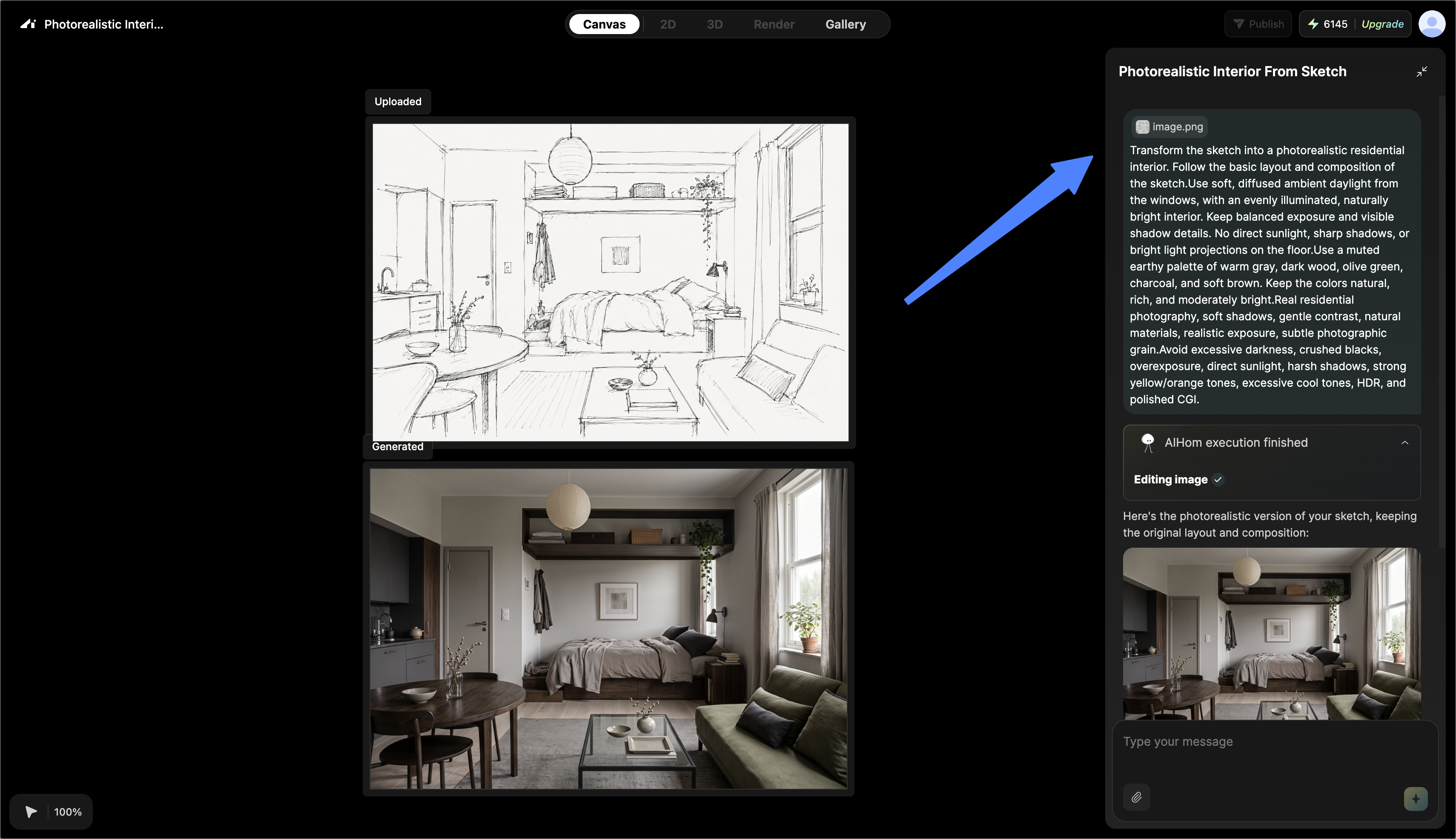
Example:
> Render this sketch as a modern luxury living room with warm lighting and natural materials.
Describe the Intended Result
----------------------------
Include details that are visible in the finished image, such as:
* Interior style
* Materials
* Colors
* Lighting
* Atmosphere
Keep the request consistent with the geometry and concept shown in the sketch unless you also want AIHom to reinterpret the design.
When to Use Sketch Rendering
----------------------------
This workflow can help:
* Interior designers explore early concepts.
* Homeowners visualize design ideas.
* Creators produce visual design content.
* Students and professionals present an early-stage concept.
**Expected result:** A realistic interior image based on the uploaded sketch and written direction.
Turn 3D Screenshots into Realistic Renders
==========================================
Upload a screenshot of an existing 3D interior concept and use AIHom to create a more realistic presentation with enhanced materials, lighting, textures, and atmosphere.
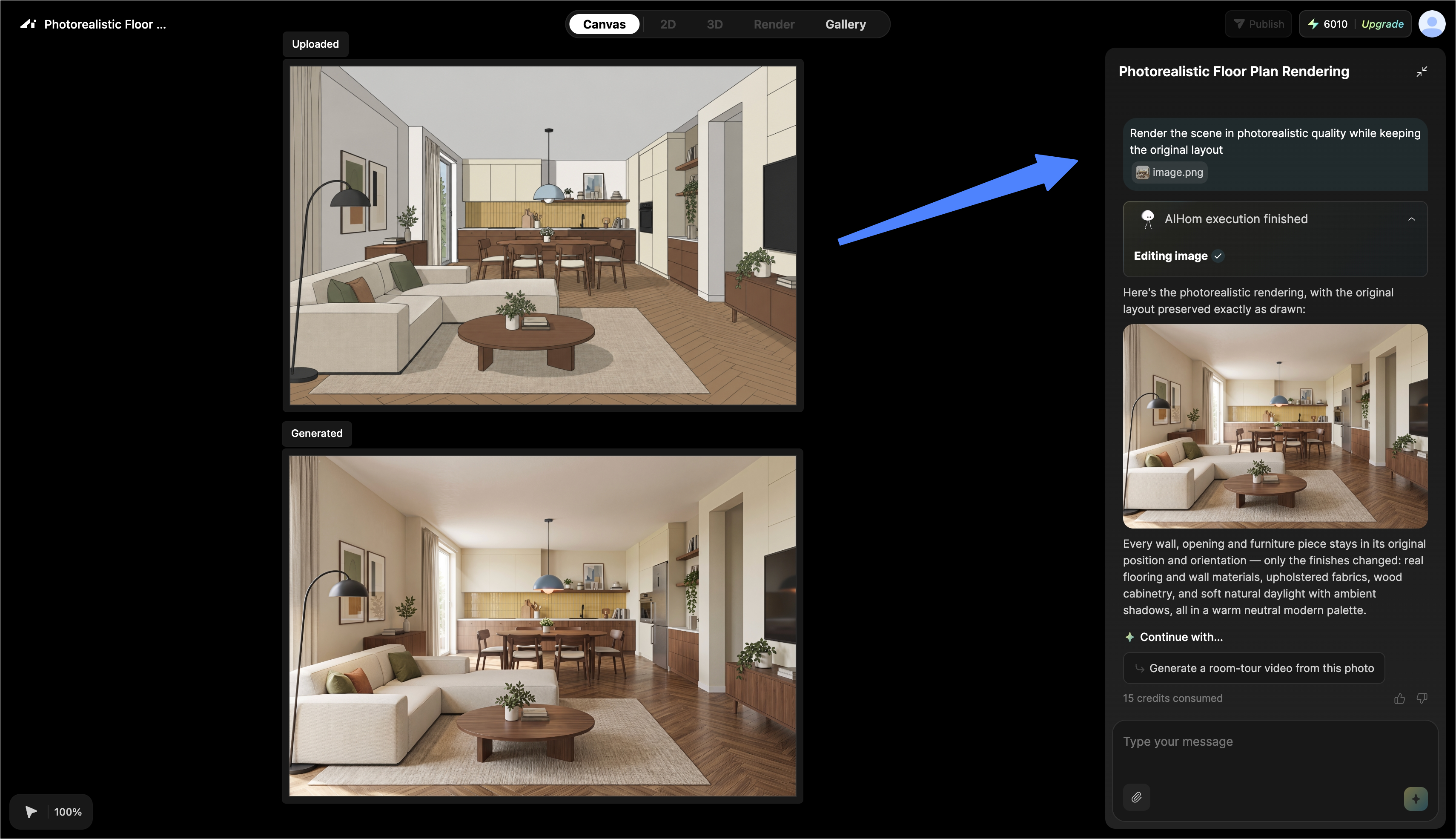
Generate a Render from a 3D Screenshot
--------------------------------------
1. Upload the 3D design screenshot.
2. Tell AIHom to render it.
3. Describe any specific style, material, lighting, or atmosphere requirements.
4. Review the generated render.
**Expected result:** A realistic image based on the composition and design shown in the 3D screenshot.
Details AIHom can Enhance
-------------------------
* Materials
* Lighting
* Textures
* Interior atmosphere
* Overall realism
This workflow is useful when you already have a 3D concept but need a polished visual for review or presentation.
Continue from Images to Video
-----------------------------
After generating images, select the images you want to use and ask AIHom to generate a video. This turns the static design visuals into a dynamic presentation.
Generate Videos from your AI Designs
====================================
Use AIHom to turn a completed design, selected render, or uploaded room image into a video that presents the space from a more immersive perspective.
\[Video URL\](https://www.youtube.com/watch?v=zQt9A0pYtms)
Generate a Video from a Completed Design
----------------------------------------
1. Open your completed AIHom design.
2. Click **Generate Video**, or ask AIHom to generate a video from the selected image.
3. Wait for AIHom to create the video.
The result can present room perspectives, interior details, furniture arrangements, and the overall design atmosphere.
Generate a Video from a Selected Render
---------------------------------------
1. Open the renders generated for your design.
2. Select the view you want to feature.
3. Ask AIHom to generate a video.
Choose a render that clearly shows the room or perspective you want to present.
Generate a Video from a Room Image
----------------------------------
1. Upload a room image.
2. Ask AIHom to generate a video from the image.
This option can animate an existing room photo or a design concept without requiring a completed AIHom project.
\[Video URL\](https://www.youtube.com/watch?v=d5viVVy_nM4)
Get Better Video Results
------------------------
* Use a clear, well-lit source image.
* Select a view that shows the room and its spatial details.
* Choose a view that highlights the furniture layout, interior style, or design features you want to present.